
Cohort
How fast the money spent in a period came back, and what those customers have been worth since: a row per period of ads, a column per period after
The Cohort report answers the question the dashboard cannot: how long does it take for the money spent in a week to come back, and how much more does it bring in after that. The dashboard tells you what a channel earned in a date range; the Cohort report takes the ads that ran in each period and follows their customers forward, period by period, for as long as they keep buying.
It is designed for Marketer Spend View, laid out as a table, which is why its control bar has no Conversion Event: the report is about revenue. The Attribution Model and the Revenue Group of your view apply. It will run under Lookback Window too, but a lookback cannot see past its window, so the columns stop where the window ends and the long tail that this report exists to show is cut off. Switch to Marketer Spend View before reading it.
Reading the grid
Each row is a cohort: the ads that ran in one period, with that period's spend shown as a negative number. Each column is a period after that one: what the cohort's customers brought in during the first period after the ads ran, the second, the third. The BE column says in which period the cohort's cumulative revenue passed its spend, and that cell is outlined in the grid; a dash means it has not happened yet.
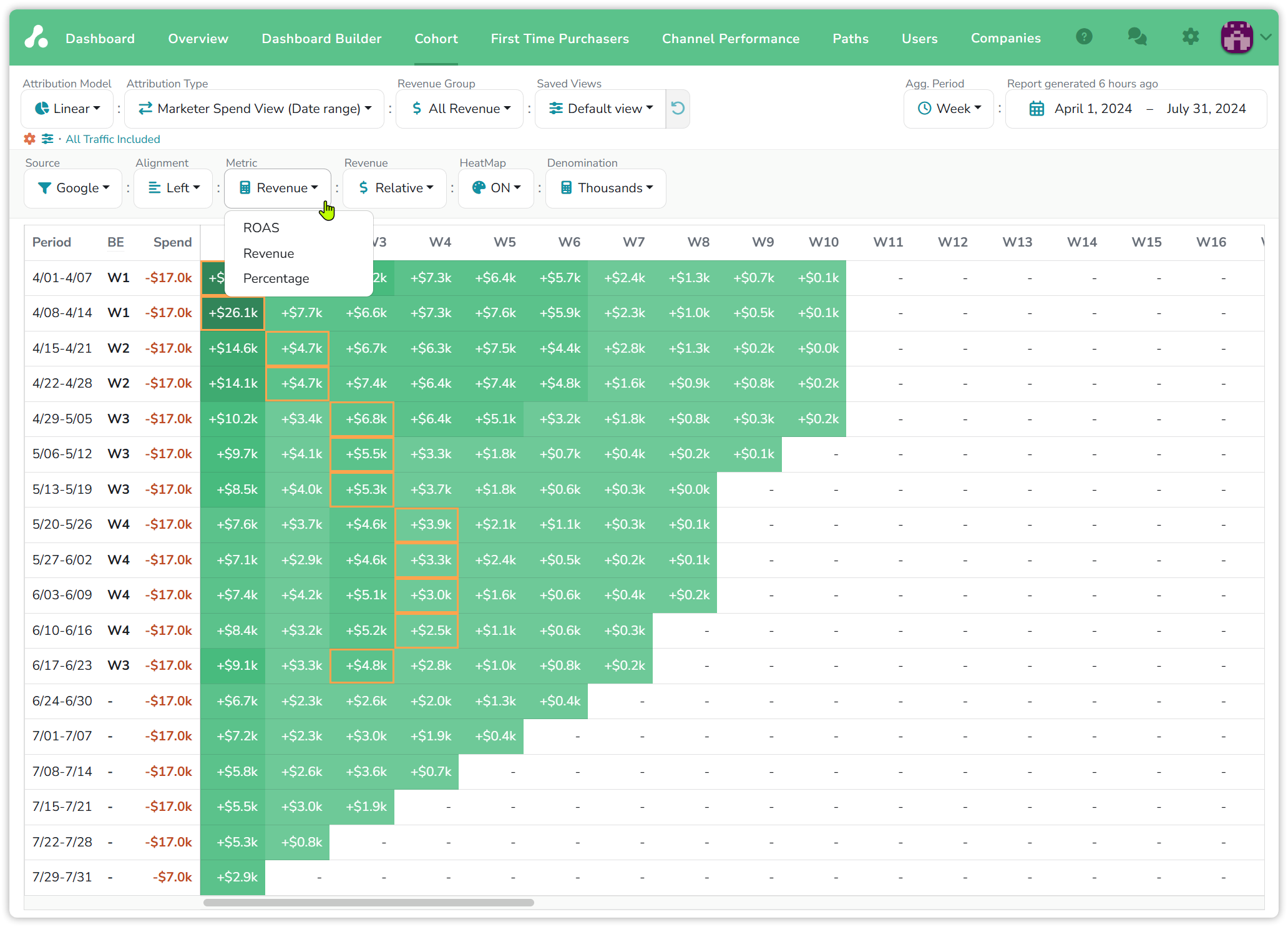
Read one row. Google's ads in the week of April 8 to 14 cost $17.0k. In their own week they returned $26.1k, so the row breaks even in week 1 and the first cell is outlined. The following weeks added $7.7k, $6.6k, $7.3k, $7.6k, $5.9k, then $2.3k, $1.0k, $0.5k and $0.1k as the customers that week acquired stopped reordering. Ten weeks on, $17.0k of ads has produced about $65k of revenue.
Now read down the BE column. The weeks of April pay back in one or two weeks; by May it takes three; by late May and June, four. Two months later the same spend is taking twice as long to come back. The weeks from June 24 onward show a dash: they have not paid back yet, and most of their columns are still empty because the periods have not happened.
The controls
- Source: All Traffic, a channel or a filter. From the dashboard, a row's menu has Open in Cohort Report, which lands here with that row selected.
- Agg. Period: day, week, month or quarter, the length of both the rows and the columns.
- Metric: Revenue in money; Percentage, revenue divided by spend; and ROAS, which shows revenue minus spend, that is cumulative profit, red while negative and green once the cohort has paid back.
- Revenue: Relative shows what each period added on its own, with a plus sign; Absolute shows the running total. The Metric ROAS is always cumulative.
- Alignment: Left lines cohorts up by age, so week 1 sits under week 1 for every row and cohorts can be compared; Right lines them up by calendar, each row starting under its own week, so a column is a real week and shows what every earlier cohort was still adding to it.
- HeatMap colours the cells by how far above or below break-even they are, and Denomination shows cents, dollars or thousands.
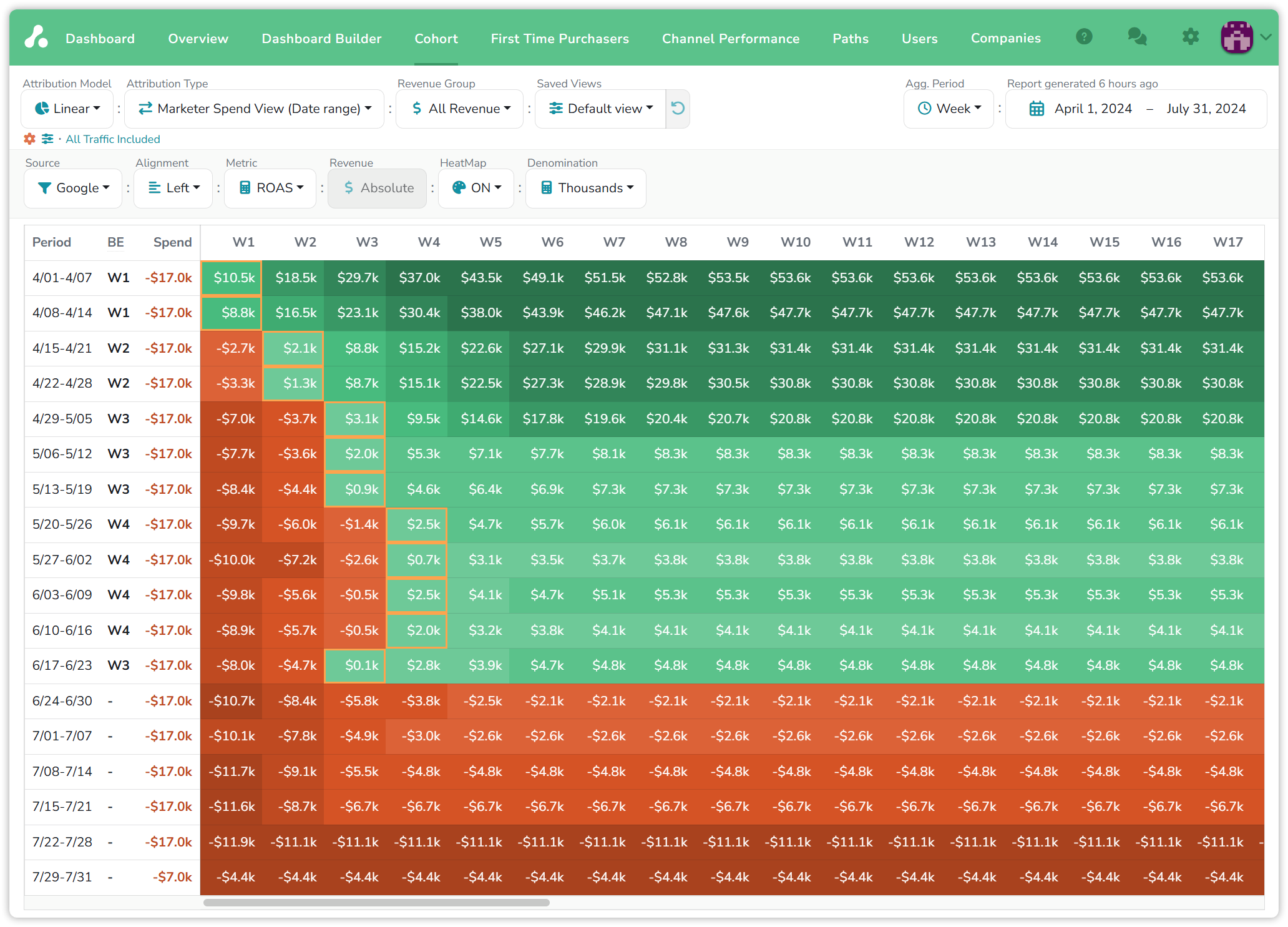
The ROAS metric is the same weeks as profit. The week of April 1 to 7 starts at $10.5k in the black and climbs to $53.6k by its tenth week, then stops moving: those customers are done. The May weeks spend their first two columns in the red and turn green in week 3, and the weeks from June 24 are red all the way across, which here means not yet rather than never.
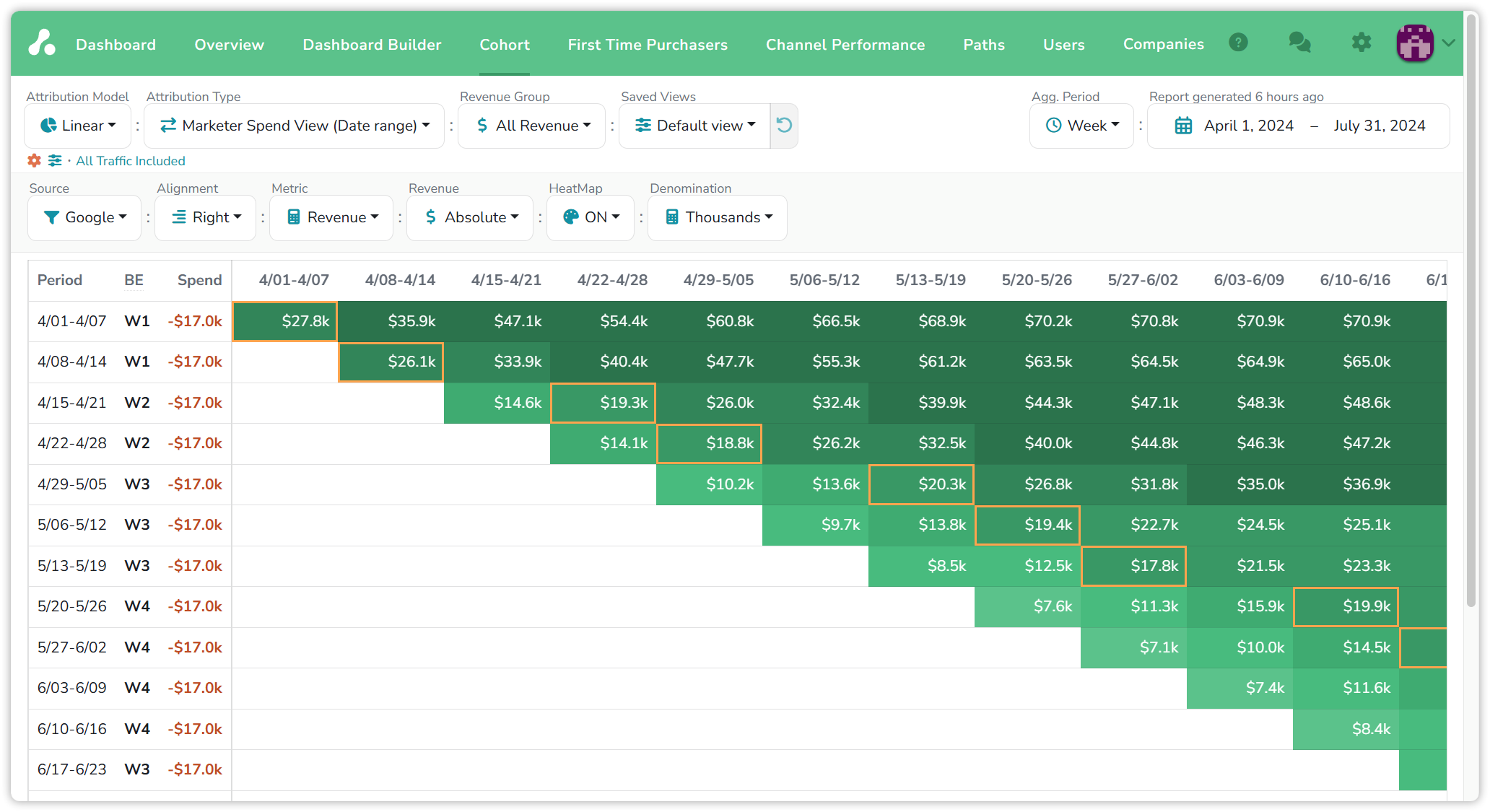
Right alignment turns the triangle the other way. The week of April 1 to 7 starts at $27.8k in its own column and reads $70.9k by the week of June 10; each later row starts one column further right. Read down a column instead of along a row and you see how much of a given week's revenue came from ads that ran weeks earlier.
Changing the period
The same data at a different period length answers a different question.
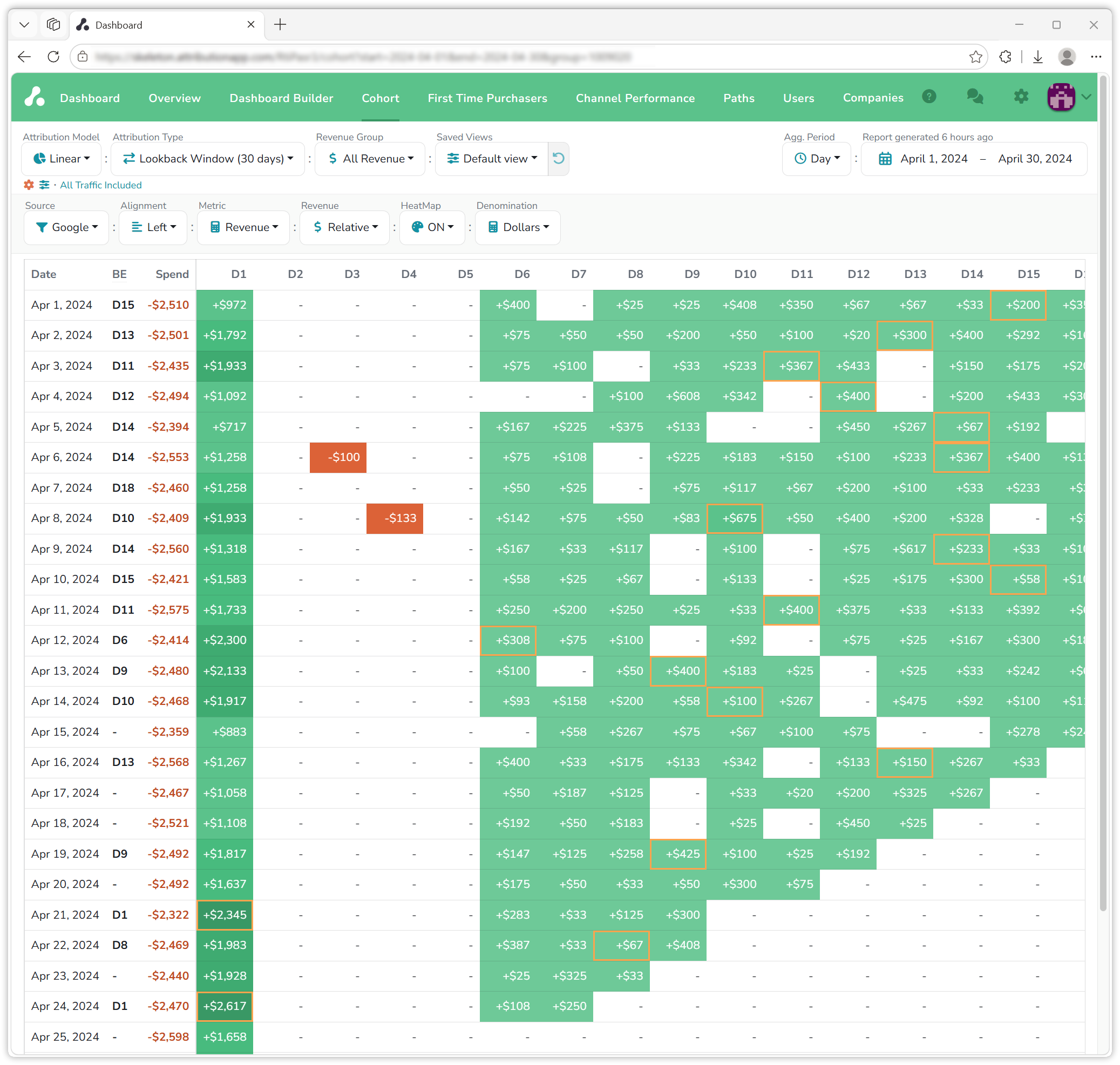
At daily periods in April, the return has a shape: most of a day's revenue arrives on the day itself, nothing on days two to five, then a long tail from day six on, with a refund or two in red. Two days, April 21 and April 24, paid back on the day, their day-one revenue above their spend; most days took around two weeks. This is the view that showed one customer their Google ads never broke even on weekends, after which they moved that spend to Wednesday and Thursday for a double-digit lift in revenue.
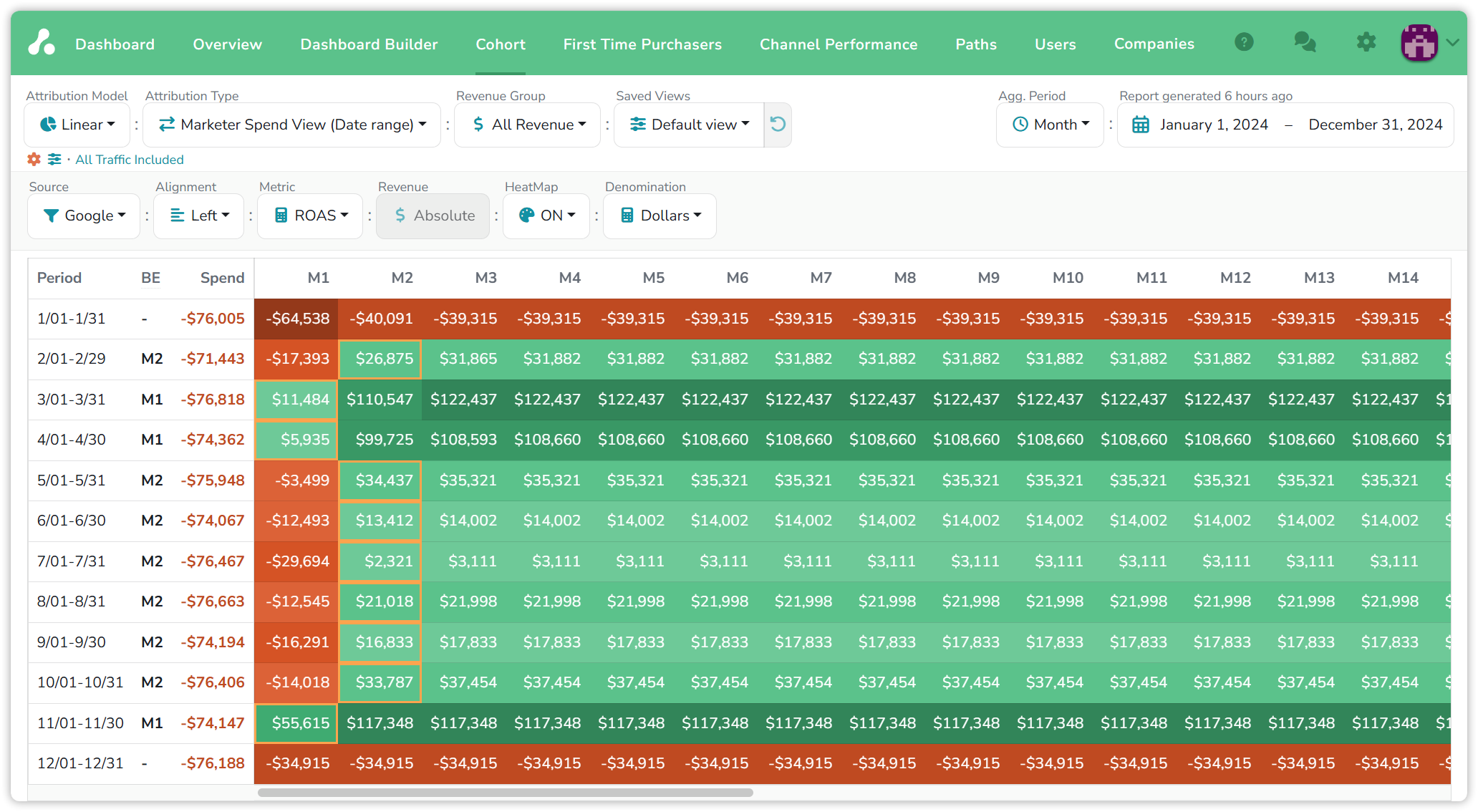
At monthly periods across 2024, the year's shape appears. March, April and November paid back inside their own month and ended at $122k, $109k and $117k of profit; the months from May to October paid back in month two with far smaller profits; January never paid back at all, ending $39k down, and December is still red with its columns ahead of it. Over a year the Cohort report is a seasonality chart with the spend attached.
What people find here
- How fast the spend comes back. Companies have cut break-even from seven or eight weeks to two by moving spend toward the cohorts that pay back fastest, and the report shows the trend week by week, as the April to June rows above do.
- Whether a channel ever pays back. Set Source to a channel or a campaign and read the BE column. A row of dashes that never turns is the answer.
- Whether a promotion made money. Switch to Absolute and compare the total revenue of the promotion weeks with ordinary weeks. One company ran a 50% discount for three weeks and found the three weeks' revenue matched any other three: more customers, more orders, the same money, and a strategy they chose not to repeat.
Reading the numbers
- Recent cohorts are incomplete. Their right-hand cells are empty because those periods have not happened, and their break-even is a dash because it has not happened yet. Compare cohorts of the same age.
- The grid is generated on request and stamped with its age, "Report generated 6 hours ago"; refresh it when you need today's data.
- Spend is the period's spend on the chosen source, including spend entered by hand on a filter; see Channels, filters & groups.
- Revenue is split by the view's Attribution Model, so a cohort's cells hold Google's share of each order, not whole orders. Change the model and the grid changes with it.
If you have any questions please contact [email protected].
Updated 15 days ago