
First Time Purchasers
Split attributed revenue and conversions into first purchases and repeat purchases, per channel and per period
The dashboard tells you which channels bring revenue. The First Time Purchasers report splits that revenue in two: purchases by people buying from you for the first time, and purchases by people who have bought before. That is the difference between acquisition and retention, and a campaign can be good at one and poor at the other while the dashboard total looks the same.
The split follows one rule. A purchase is first-time when the visitor has no earlier purchase anywhere in their history, not only inside the date range you are looking at. Every later purchase by that visitor is a repeat. A purchase here is any event in the selected Revenue Group that carries revenue; the report has no Conversion Event of its own.
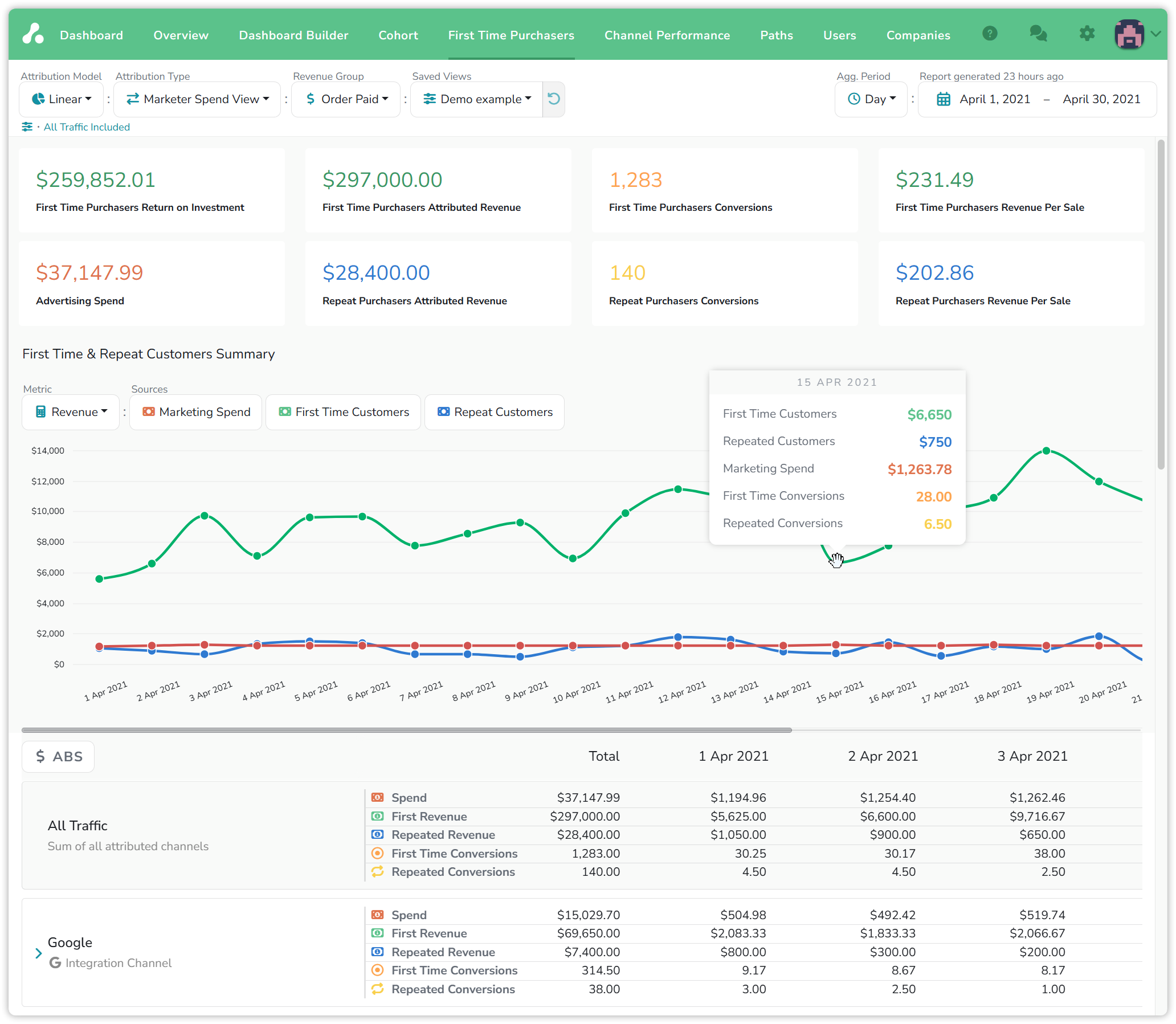
Examples: a watch store's demo project, April 2021, Order Paid · Linear · Marketer Spend View.
The summary cards
The eight cards read as pairs, first-time on the top row and repeat on the bottom, with spend in the lower left.
| First-time | Repeat | |
|---|---|---|
| Attributed Revenue | $297,000.00 | $28,400.00 |
| Conversions | 1,283 | 140 |
| Revenue Per Sale | $231.49 | $202.86 |
Advertising Spend for the month was $37,147.99. The first card, Return on Ad Spend, is first-time revenue minus that spend: $259,852.01.
Two things stand out before any drill-down. Ten times more revenue came from new buyers than from returning ones, and a new buyer spent more per order than a returning one. Conversions can be fractional, 314.50 for Google, because the Linear model splits each purchase across the visits that led to it.
The chart
The First Time and Repeat Customers Summary chart draws three lines over the date range: Marketing Spend in red, First Time Customers in green, Repeat Customers in blue. The three buttons under Sources switch each line on and off, and Metric swaps the lines between Revenue and Conversions. Hovering a point gives that period's values: on 15 April, $6,650 from first-time customers and $750 from repeat customers against $1,263.78 of spend, from 28 first and 6.5 repeat conversions.
The shape to look for is the two revenue lines moving against each other. Spend that moves customers from one line to the other rather than lifting both is the pattern the next section describes.
The table
Below the chart, the rows are the same channels, filters and groups as your dashboard, and each row carries five metrics per period: Spend, First Revenue, Repeated Revenue, First Time Conversions and Repeated Conversions. Agg. Period sets the column width, from Day to Month, and the Total column sums the date range.
The $ ABS / $ REL toggle changes what the period columns show. ABS shows the values. REL shows the change from the previous period, with a plus or a minus, so a row that is gaining or losing new customers stands out. Hover a REL cell to see the absolute values behind it.
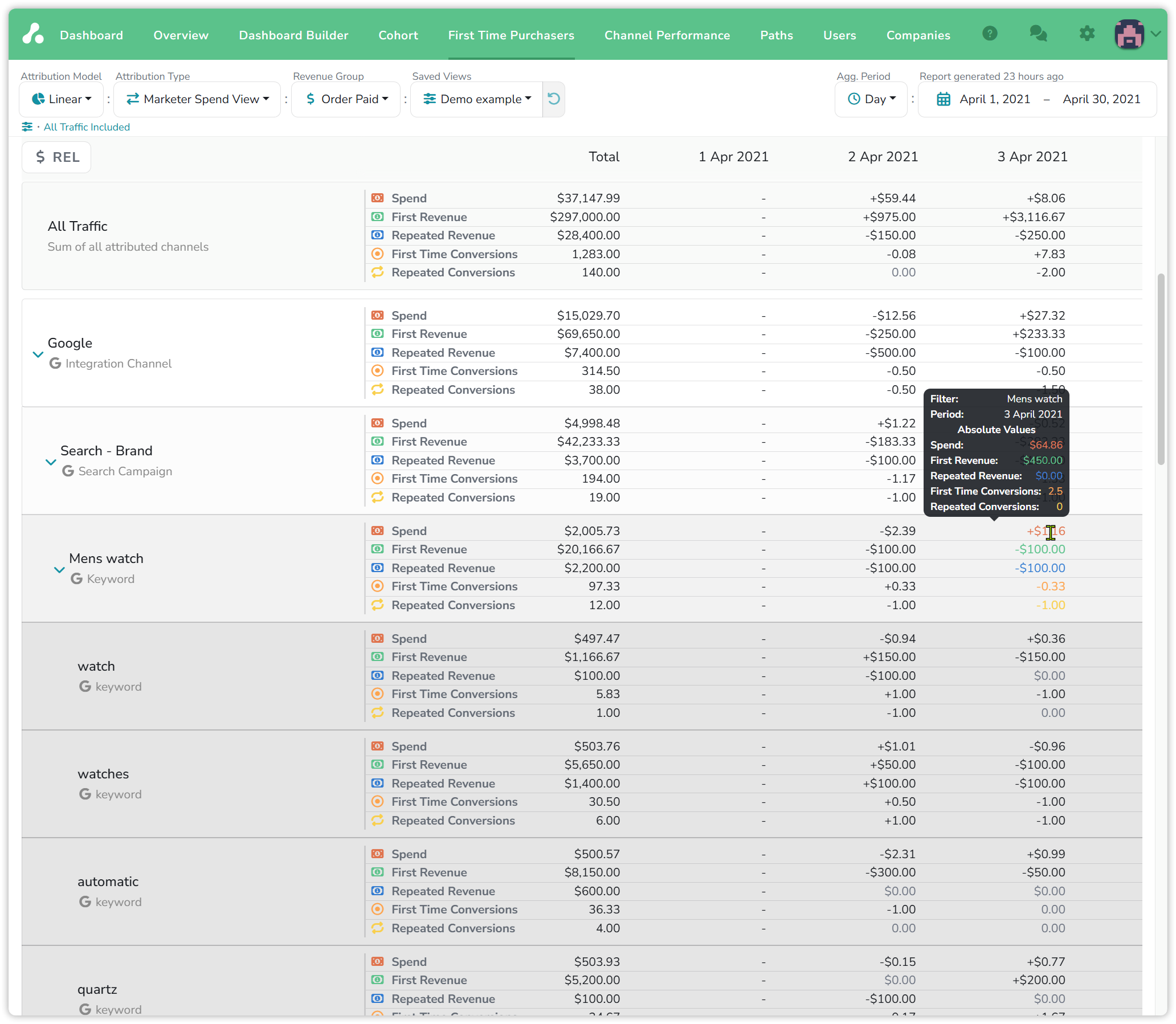
Expanding a channel takes you down the same tree as the dashboard: channel, campaign, keyword, keyword variation. In the example, Google brought $69,650 of first-time revenue and $7,400 of repeat. Its Search - Brand campaign alone is $42,233.33 against $3,700.00, more than eleven to one. People searching for the brand by name are mostly new buyers, and the Mens watch keyword below it keeps the same ratio down to its variations.
What people find here
An agency running a store's ads started a Klaviyo campaign to bring back past customers. In this report the repeat line climbed as planned. Then the first-time line fell: budget had moved away from the campaigns that brought new buyers. On the dashboard, revenue was flat for the whole period. Here the swap was visible by the week, and they rebalanced before the quarter closed.
The question this report answers for each campaign, ad group or keyword is which kind of customer it brings. A keyword that drives repeat purchases is doing retention work, and belongs in a different budget from one that drives first purchases.
Reading the numbers
- Attribution Type changes the split. Under Marketer Spend View, a purchase is credited to the visits in the date range that led to it. Under Lookback, the lookback window decides which visits count. A long-cycle purchase can appear under one type and not the other.
- The Revenue Group decides what counts as a purchase. Only events in the selected group that carry revenue appear here. Switch the group and a visitor's first purchase can move to a different date, or disappear.
- First-time looks at the whole history. A customer whose first order was last year is a repeat buyer in every later month, even if the report's date range starts after that order.
- Conversions without revenue are not here. A sign-up or a trial start that carries no amount is a conversion on the dashboard, but not a purchase in this report.
Updated 15 days ago