
Paths
The routes customers take to a conversion: the most common sequences of visits, how long they take and what they are worth, and every individual visitor's path
A path is one visitor's visits in order, ending in the conversion. Attribution records every visit from the first one, before it knows who the visitor is, so by the time someone converts their whole route is known. The Paths report lays those routes out, first the common ones across all converting visitors, then each one on its own.
Paths come before the attribution model. The model's job is to split a conversion's credit across the visits in its path; this report shows the path itself, which is why the control bar here has no Attribution Model. The Attribution Type still applies, because it decides which visits belong to a path at all: under Lookback Window, the visits inside the window before the conversion; under Marketer Spend View, the visits in the date range and the conversions they led to. Change the type and the same conversion can show a shorter or a longer route.
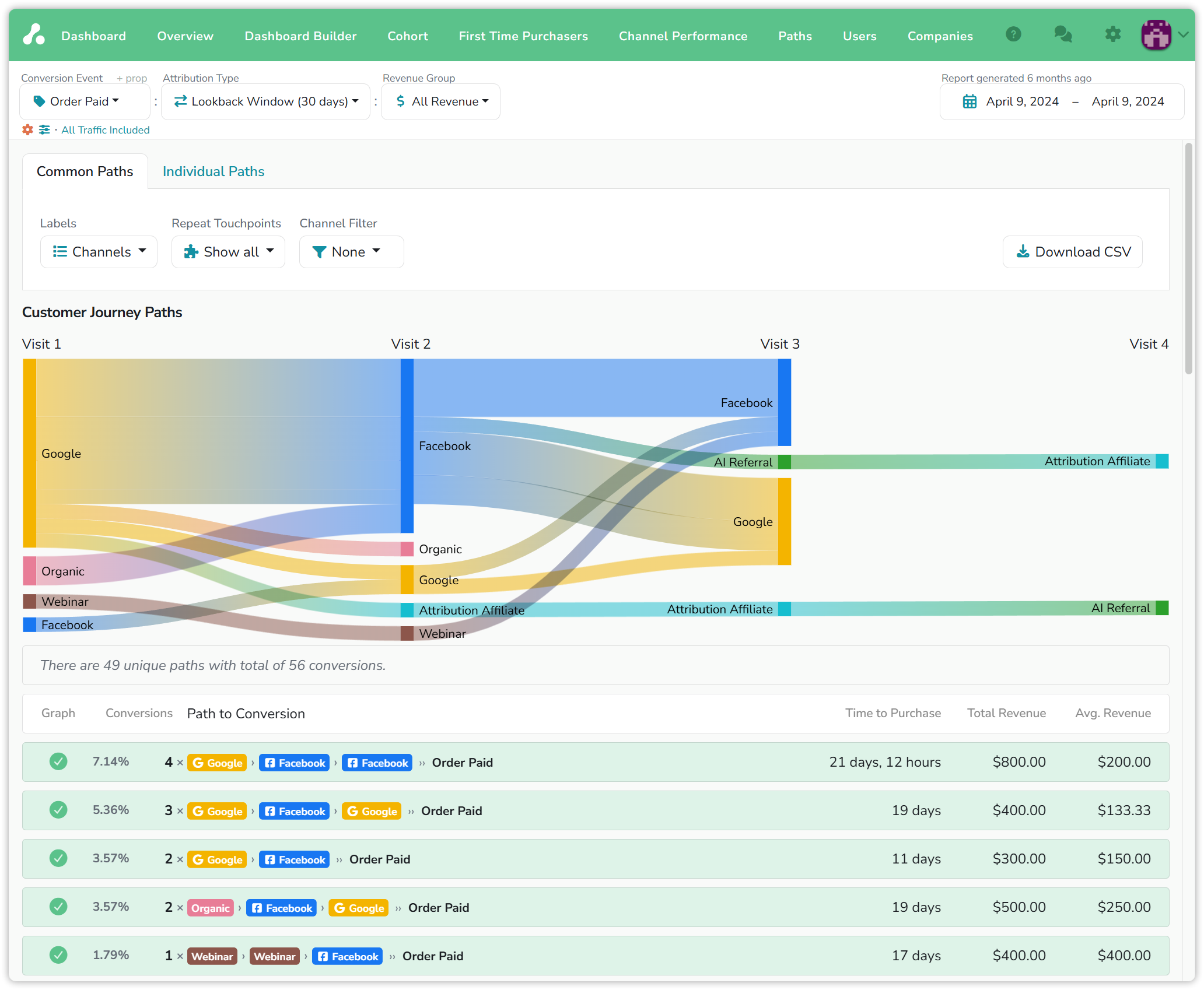
Examples: demo project, Order Paid on 9 April 2024, Lookback Window (30 days) · All Revenue.
Common Paths: the diagram
The Customer Journey Paths diagram reads left to right. Each column is a visit, Visit 1 to Visit 4, each block is a channel, and the width of a band is the number of conversions that went that way. The ten most common paths are drawn.
In the example, Google is where most converting visitors first met the store. Facebook is where most of them came back: the widest band runs from Google on Visit 1 to Facebook on Visit 2, and from Facebook to Facebook again on Visit 3. Almost nothing flows from Facebook on Visit 1 to Google later. People tend to stay on the platform they met you on, and this diagram is where that shows.
Common Paths: the table
Below the diagram, one line per path, most common first:
- Graph: the checkbox that puts a path in the diagram. Untick a path to take it out, or click the header to clear them all and draw only the ones you want to compare.
- Conversions: the path's share of all conversions, and the count.
- Path to Conversion: the channels in order, ending in the conversion event.
- Time to Purchase: the average time from the first visit to the conversion.
- Total Revenue and Avg. Revenue: what the path's conversions were worth, in total and each.
The first line in the example is Google › Facebook › Facebook › Order Paid: 4 conversions, 7.14% of the total, 21 days and 12 hours on average, $800 in all. Three lines down, Organic › Facebook › Google took 19 days for 2 conversions at $250 each, more per order than any Google-first path above it.
The table shows the top 50 paths; everything below them is rolled into one line at the end. The sentence between the diagram and the table says how much the table covers, for example:
There are 152 unique paths with total of 668 conversions. Top 50 unique paths stand for 84.73% of conversions.
The controls
- Labels switches the badges between Channels and Filters. Channels answer "which platforms"; Filters answer "which campaigns", at the cost of many more unique paths.
- Repeat Touchpoints is Show all or Combine. Combine folds consecutive visits from the same channel into one touchpoint, so Google › Google › Facebook and Google › Facebook become one path. Use it when the question is the sequence of channels rather than the number of visits.
- Channel Filter keeps only the paths that touched a channel, anywhere in the route. Filter on Google and you see every conversion Google had a hand in, including the ones where it was the middle visit, which the ad platform's own reports never show.
- Download CSV exports the table, or on the Individual Paths tab, the visitors.
Individual Paths
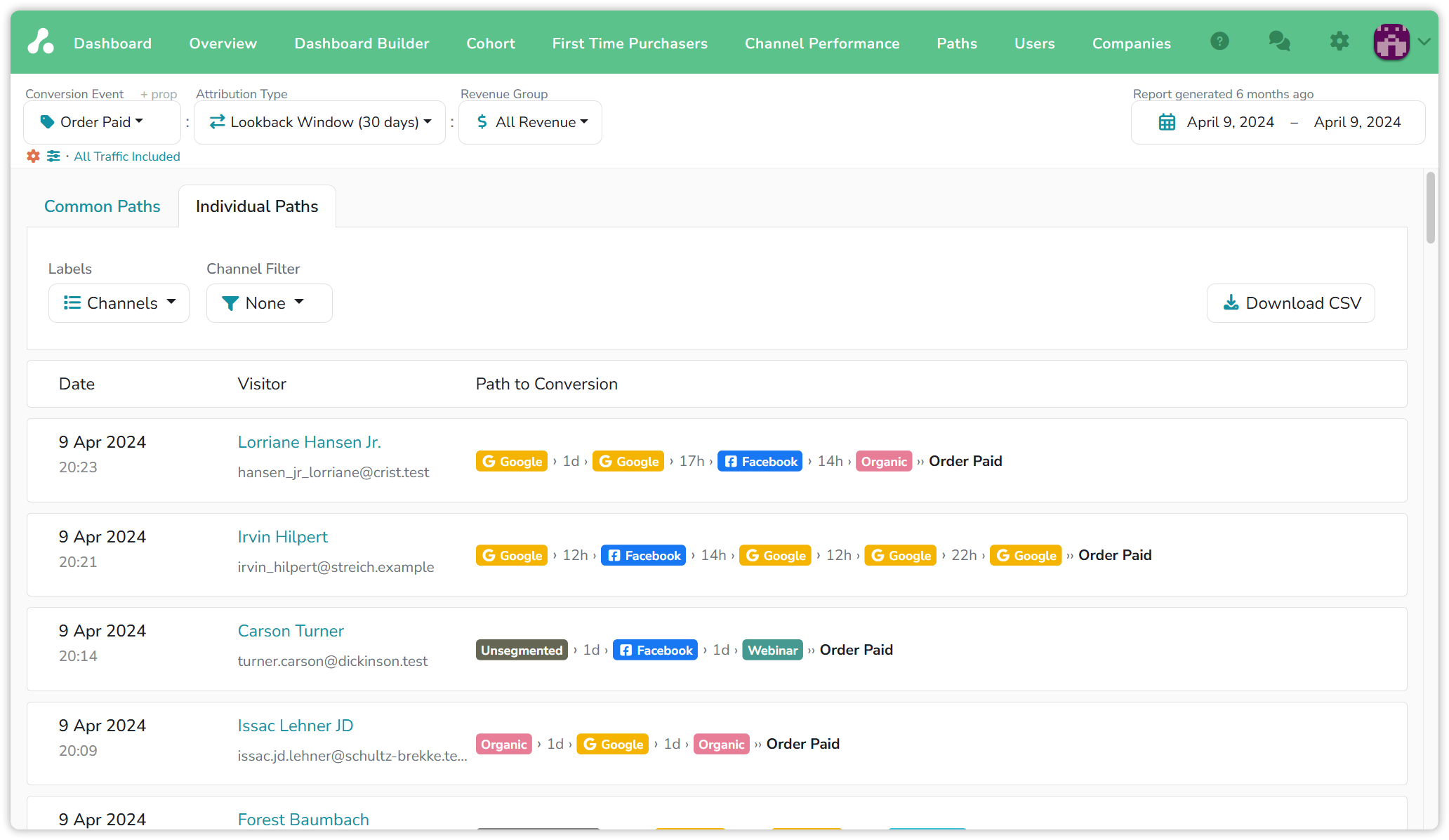
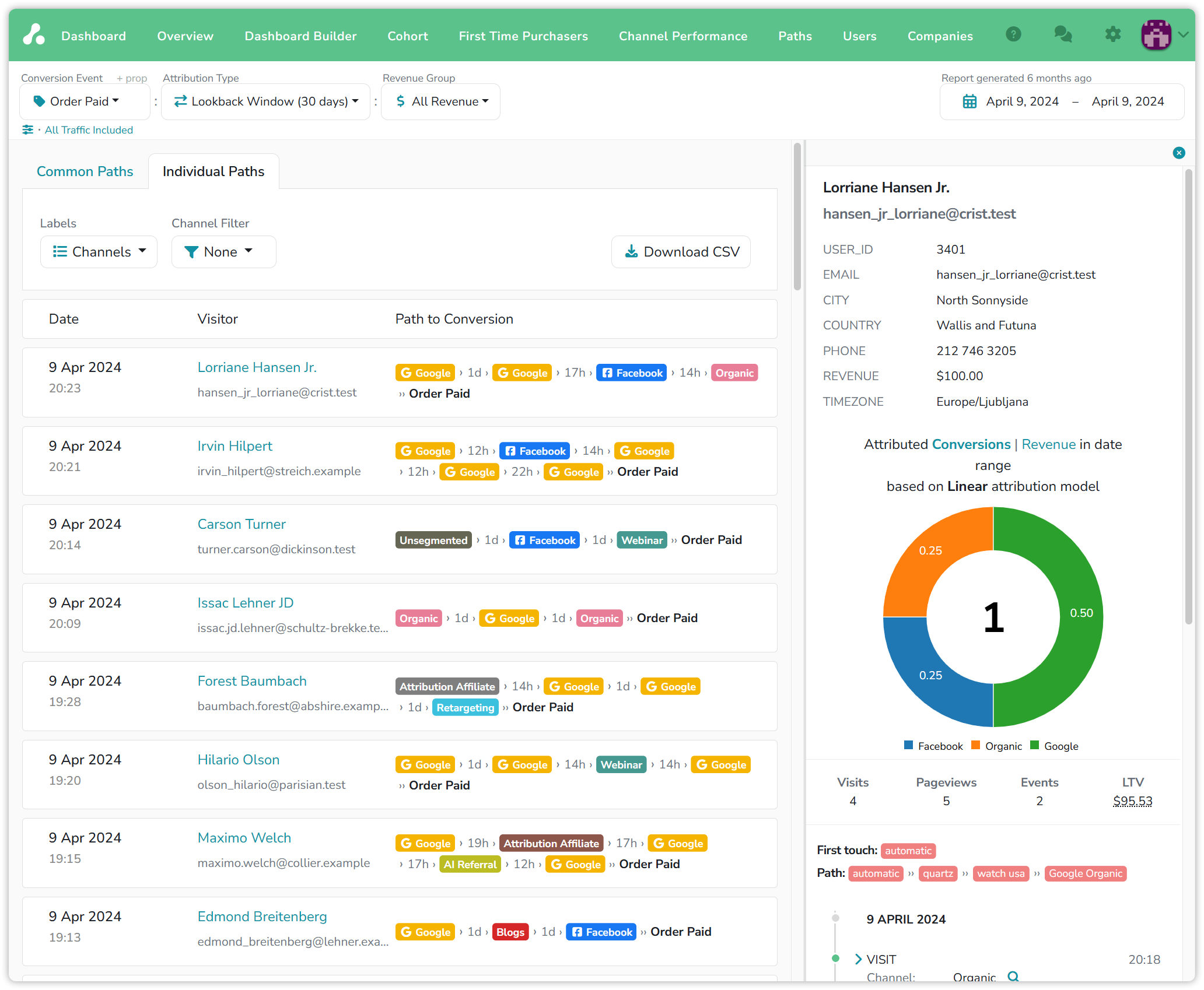
The second tab lists every converting visitor the report counts, one per line: the date and time of the conversion, the visitor's name and email, and the path as badges with the time between visits written between them. Lorriane Hansen Jr. reached Order Paid through Google, Google a day later, Facebook 17 hours after that, and Organic 14 hours after that.
Click a visitor's name to open the sidebar, the same one as on the dashboard: traits, the full visit timeline, and the donut of how the current model splits this visitor's conversion. Lorriane's four visits become 0.50 Google, 0.25 Facebook and 0.25 Organic under Linear. That donut is the path and the model side by side; see Attribution models for the rules behind the split.
With Channel Filter set, Individual Paths is the list of people a channel touched. Downloaded as a CSV, that list can go back to the ad platform as offline conversions, so a channel that mostly assists is given the conversions it helped with.
What people find here
A customer was sure of their cross-channel strategy: people found them on Facebook, clicked, and came back later through Google. Paths showed the opposite. Visitors who met them on Facebook came back on Facebook, and Google visitors came back on Google; the Facebook › Google path barely existed. They rebuilt the plan around what the routes actually were.
The report is also the place to compare routes by value. When one channel's paths are more common but another's are shorter and worth more per order, Time to Purchase and Avg. Revenue say so on one screen, and budget follows.
Reading the numbers
- The date range is the conversion's date. A path is listed under the day its conversion happened; the visits in it can be older.
- Attribution Type decides how far back a path reaches. Under Lookback Window, visits inside the window before the conversion are the path. Under Marketer Spend View, visits in the date range are the start of the path. A visitor with no visit inside the window has no path here; see Attribution types.
- Combine changes the path count, not the conversion count. Fewer unique paths, the same conversions.
- A path too long to draw shows a Hidden badge in place of its touchpoints. The conversion still counts.
Updated 14 days ago