
Attribution types
Lookback Window or Marketer Spend View: which end of the journey the date range anchors on, the lookback window, the look-forward scope, and one visitor read four ways
A date range on the dashboard has to pick one of two things: the conversions that happened in it, or the visits that happened in it. The Attribution Type is that choice. Lookback Window takes the conversions dated in the range and looks back a set number of days for the visits that earned them. Marketer Spend View takes the visits dated in the range and looks forward to the conversions they went on to produce. The Attribution Model splits the credit among the touchpoints; the type decides which touchpoints and which conversions a view is looking at in the first place.
The type is a setting of your view, chosen from the attribution dropdown in the control bar. The dropdown reads "Lookback Window (30 days)" or "Marketer Spend View (Date range)" so the current choice is always visible, and switching it re-reads the same visits and conversions, nothing is lost by trying each.
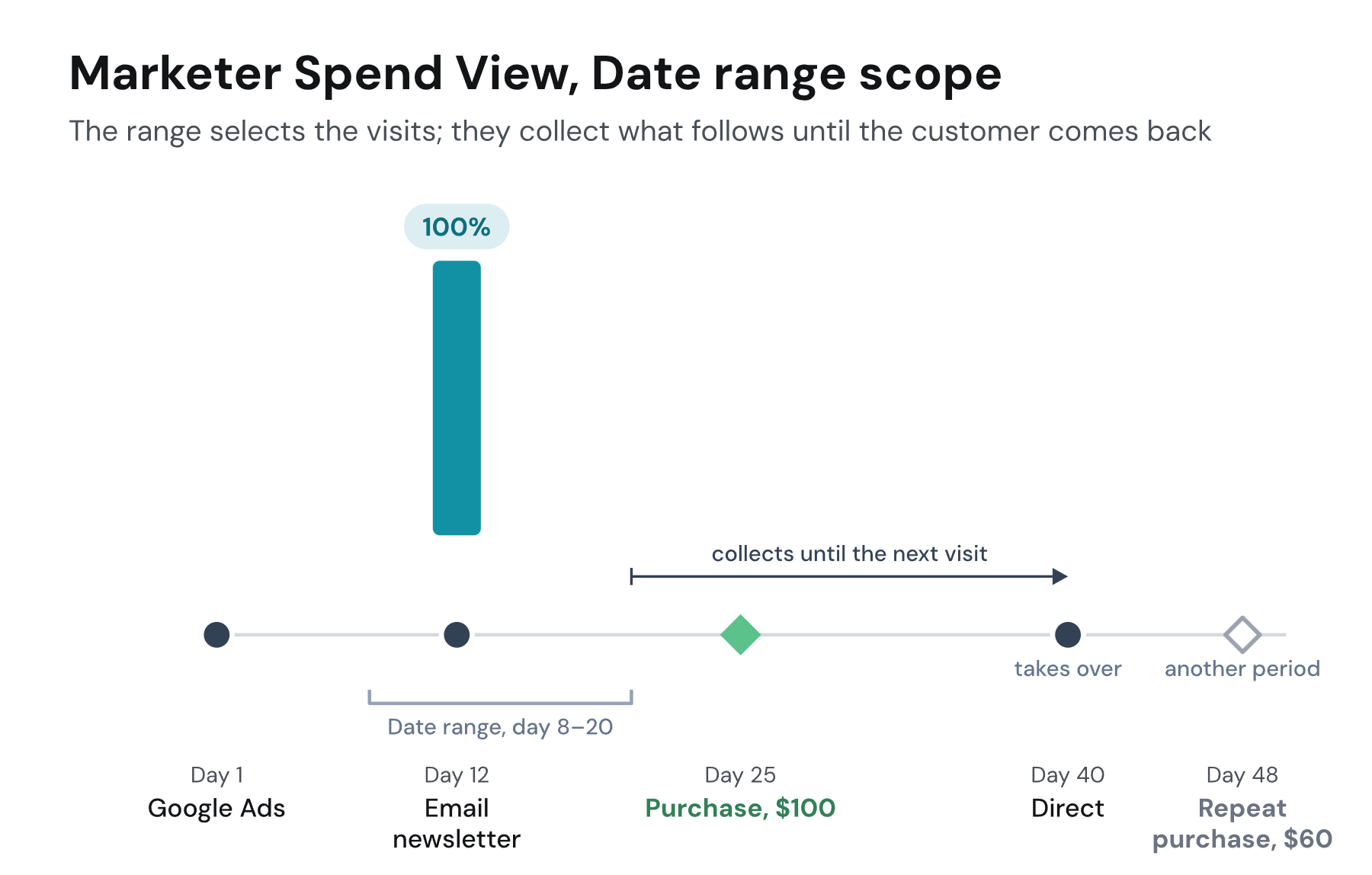
The diagrams follow one visitor: a Google Ads click on day 1, a newsletter click on day 12, a $100 purchase on day 25, a direct visit on day 40 and a $60 repeat purchase on day 48. The model is Linear and all traffic is included throughout, so the only thing changing between the pictures is which visits and purchases the range lets in.
Lookback Window
The range selects the purchases; the window selects the visits that earn them. A range of day 15 to 30 contains the $100 purchase. With a 30-day window, both earlier visits are inside the window, and under Linear each earns $50. With a 14-day window, the Google Ads click on day 1 is 24 days before the purchase and falls outside; the newsletter click, 13 days before, takes the whole $100. The repeat purchase on day 48 is outside the range and belongs to whichever period contains day 48.
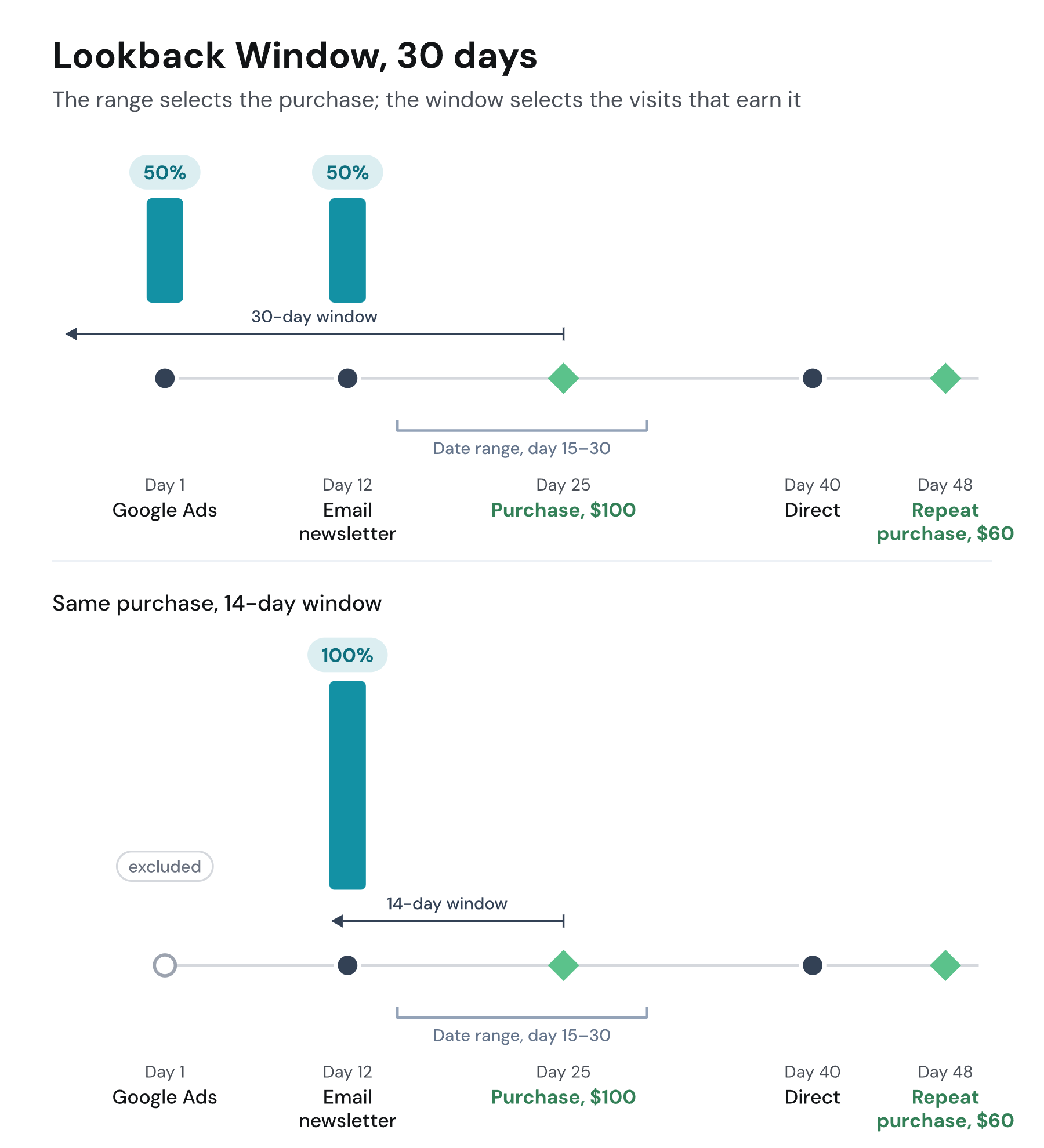
The window is set with the type: 30 and 90 days are offered, and Add Custom accepts any length from 1 to 365 days. Match it to how long your customers take to decide. A window shorter than a typical journey credits only the touches near the decision and leaves the visits that started it with nothing. A purchase whose visits all fall outside the window has no touchpoint to credit, so it is not part of the modeled data at all: All Traffic does not count it, and it appears only in Raw Traffic. A window longer than the journey changes little, because a visitor rarely has visits older than their journey.
Lookback Window counts a conversion in the period it happened, so a period's numbers settle as soon as the period ends and never move afterwards. That makes it the type for reporting a month's sales and for reconciling with tools that also count by conversion date.
Marketer Spend View
Marketer Spend View flips the question. The range selects the visits, that is the ads and campaigns that ran in those dates, and asks what those visits produced afterwards, however long it took. It answers "for the money spent in this period, what came back", which is why return on ad spend and the Cohort report are built on it. A look-forward scope decides how far a visit's reach extends.
Date range scope
This is the default scope. A range of day 8 to 20 contains the newsletter click. It collects the $100 purchase on day 25 in full: the visits inside the range share the conversions they collect, and here there is only one. It keeps collecting until the customer comes back through a new visit after the range. The direct visit on day 40 takes over, and the $60 repeat purchase belongs to the period that contains day 40. Every conversion lands whole in exactly one period.
Lifetime scope
Nothing takes over. The visits inside the range keep a share of every later conversion of the customer, for life, and each conversion is shared across the customer's whole journey, including the visits before and after the range. The report shows only the visits inside the range, with their share.
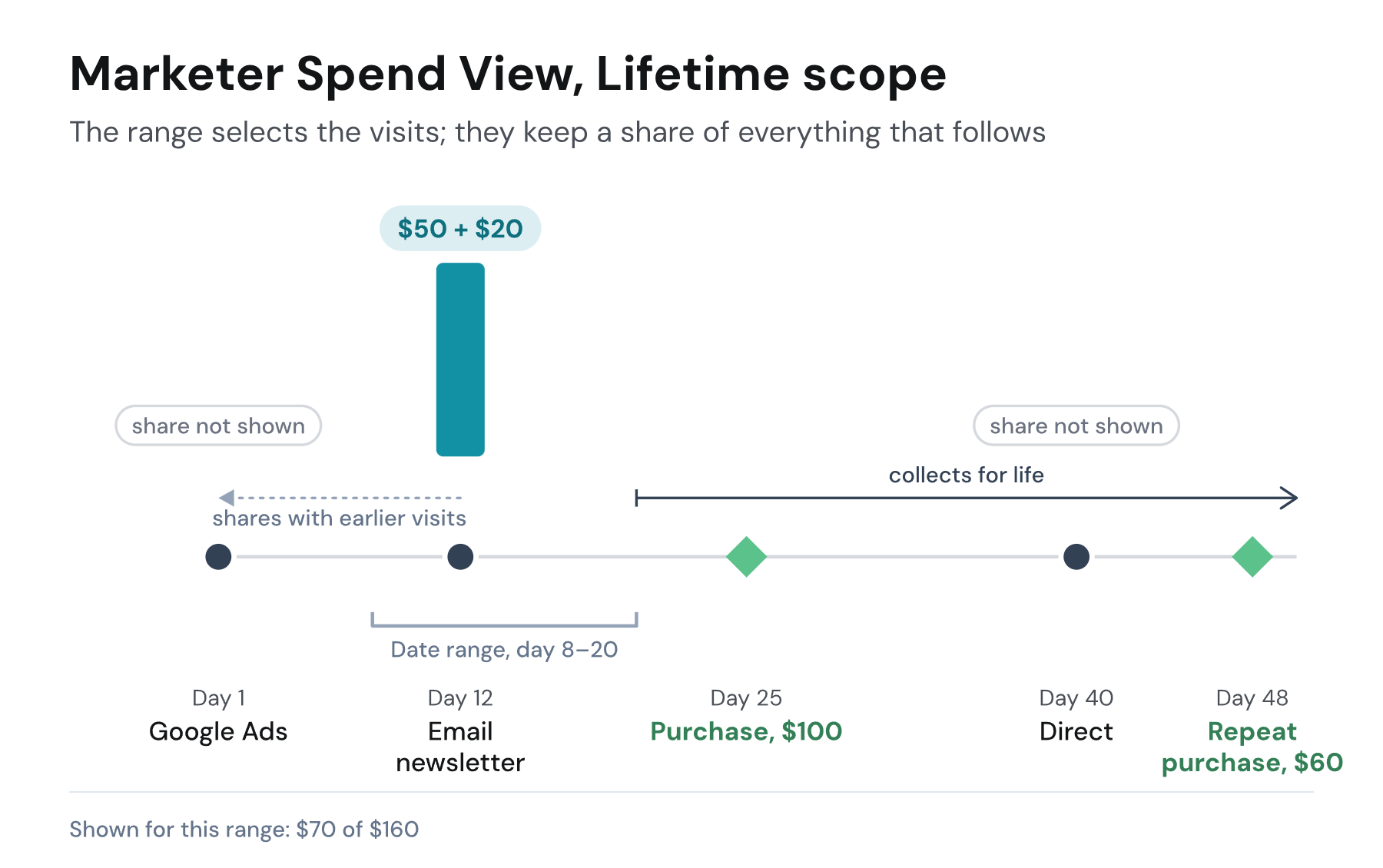
Here is where every dollar went. Each purchase is split across every visit that came before it, and the report shows only the column inside the range.
| Google Ads, day 1 | Email newsletter, day 12 | Direct, day 40 | |
|---|---|---|---|
| Purchase, $100 | $50 | $50 | |
| Repeat purchase, $60 | $20 | $20 | $20 |
| Shown for day 8 to 20 | not shown | $70 | not shown |
Three things follow. The newsletter row shows $70 although the range collected $160 of purchases, because the rest of the credit went to visits outside the range. Its conversion count is 0.83, half of the first purchase and a third of the second, so conversion counts under Lifetime are fractional. And a visit never collects a purchase that happened before it, so conversions dated before the range are not part of the reading.
Lifetime suits subscription and repeat-purchase businesses and long multi-touch journeys, where a renewal or a reorder should keep crediting the spend that acquired the customer rather than move wholesale to the latest return visit. Date range keeps every conversion whole in one period, which is easier to total and to compare period against period.
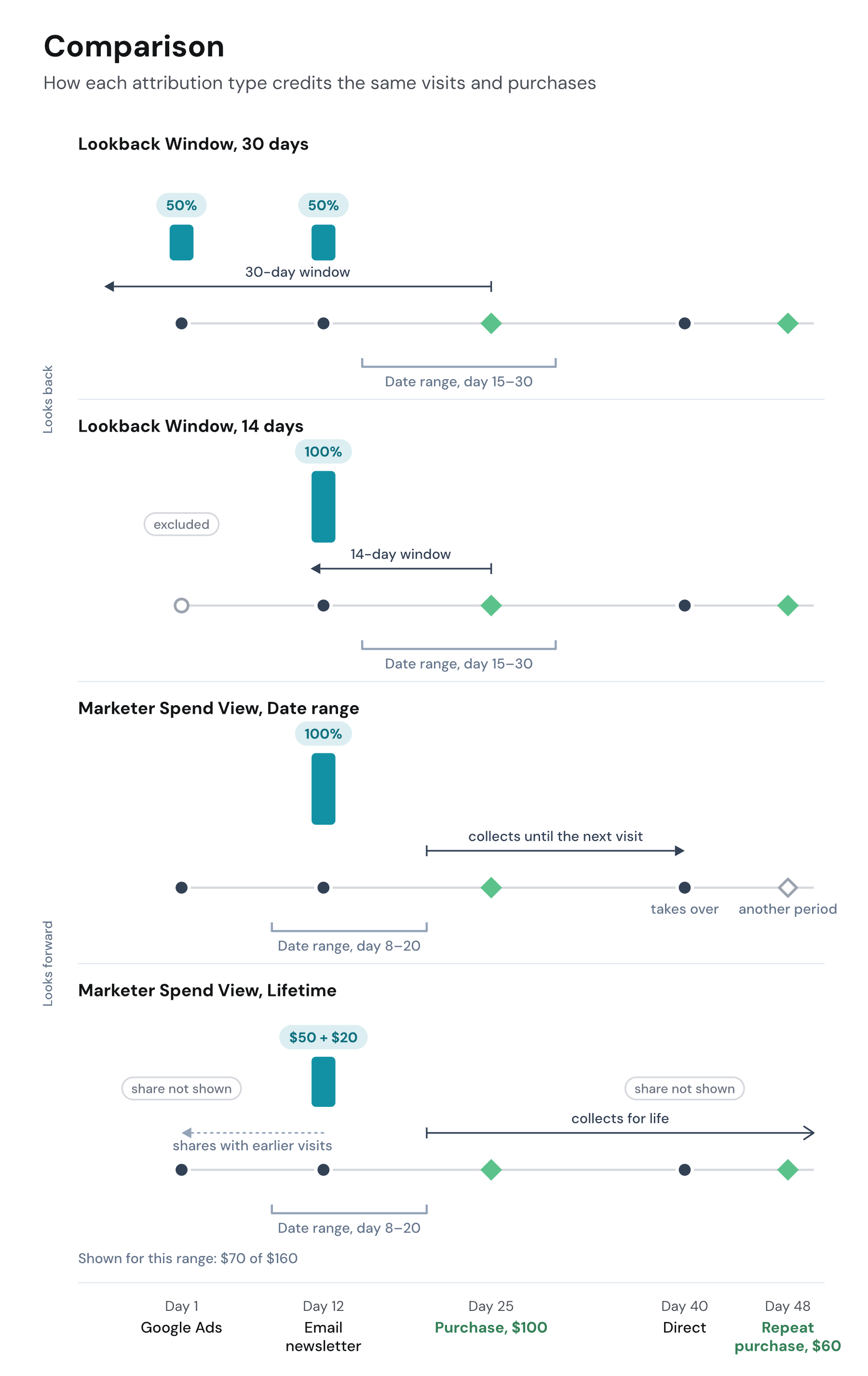
One journey, four readings
The same visitor, the same two purchases, and four different answers to what the newsletter earned.
| Reading | Google Ads, day 1 | Email newsletter, day 12 | Direct, day 40 | Shown in the range |
|---|---|---|---|---|
| Lookback Window, 30 days, day 15 to 30 | $50 | $50 | after the purchase, no credit | $100 |
| Lookback Window, 14 days, day 15 to 30 | outside the window | $100 | after the purchase, no credit | $100 |
| Marketer Spend View, Date range, day 8 to 20 | outside the range | $100 | takes over, its own period | $100 |
| Marketer Spend View, Lifetime, day 8 to 20 | $70, not shown | $70 | $20, not shown | $70 of $160 |
Reading the numbers
- Under Lookback Window, a period is final once it ends. Under Marketer Spend View, a period keeps growing: a visit in January can collect a purchase in March, so last month's revenue rises for as long as its customers keep buying. Compare periods only after an equal time has passed, or use the Cohort report, which lines periods up by their age.
- All Traffic is modeled, so it counts a conversion only when a visit inside the window or scope earned it. A conversion dated in the range with no such visit is left out, and under Marketer Spend View a conversion dated after the range is counted in. Raw Traffic counts by date only, which is why the two rows differ on purpose; see Default channels.
- Under Lifetime, the rows add up to less than the conversions the range collected, and conversion counts are fractional. The gap is the credit held by visits outside the range.
- The two types do not put the same visits and conversions in a range, so numbers read under one are not comparable with numbers read under the other. Compare like with like: the same type, the same window or scope, two date ranges or two models.
Choosing
Use Lookback Window to report what a period sold and where it came from, and whenever you need to reconcile with another tool. Use Marketer Spend View to judge spend: what the ads that ran in a period brought back. Keep the Date range scope unless renewals and reorders are a large part of your revenue, in which case Lifetime keeps them with the spend that earned the customer.
Whichever type you choose, the traffic options still decide which visits may take credit and the Attribution Model still splits it. All three are saved with the view, so a second view can read the same project the other way.
If you have any questions please contact [email protected].
Updated 20 days ago